


Last Updated
Mon 12 Oct, 2026
Snap Changelog
Snap is constantly being updated with new
features and adjustments..
Snap 4.1.1 improves Full Refresh completion, interrupted-sync recovery, and catalog count reliability, while resolving refresh, Quick Sync, Add Missing, fit warning, and elapsed-time issues.

Faster Full Refresh completion, with Product configuration checks continuing in the background.
Improved interrupted-sync recovery and manual Resume reliability.
More reliable Products and Designs counts during filtering, navigation, and synchronization.

Fixed Full Refresh failures when processing large Design metadata batches.
Fixed interrupted refreshes getting stuck after restarting the extension.
Fixed Quick Sync reporting completion when required work was skipped or deferred.
Fixed Designs counts becoming unavailable during background updates after Quick Sync.
Fixed Neutral artwork incorrectly requiring background setup in Add Missing.
Fixed unrealistic elapsed times for Add Missing queues that finished before execution started.
Fixed Girls selections being missed by the fit warning and Unselect action.
Snap 4.1.0 adds new catalog filters and Background Remover controls, updates iPhone Case pricing, and improves reliability across bulk actions, synchronization, Designs, and Snap Profiles.

Added Colors and Fit Type filtering to Products and Designs.
Added Auto selection to Snap Image Studio’s Background Remover.

Updated US iPhone Case min/max prices across Snap to match Amazon’s recent pricing changes, resolving Bulk Price issues.
Add Missing Products now shows loading immediately and filters out ineligible designs.
Improved Bulk Upload performance and progress feedback for large batches.
Reduced Bulk Draft Publisher startup work and improved recovery from Amazon rate-limit pauses.
Improved automatic pause and resume handling for bulk actions during Quick and Full Sync.
Many small improvements across Snap.
Fixed unchecked rows becoming selected again after Select all filtered.
Fixed blank missing-product counts and delayed deletion updates in Designs.
Fixed Blanket artwork scaling and saved Snap Profiles skipping product colors.
Fixed blocked listing edits during bulk price actions by trimming oversized auto-translated text.
Snap 4.0.9 improves Snap Image Studio and resolves compatibility and reliability issues across Create, Edit, Bulk Upload, Text Swap, and Snap Uploader.
General Snap Image Studio improvements and bug fixes.
Fixed a conflict with Productor on Create and Edit pages.
Fixed Bulk Upload startup failures and improved error messages.
Fixed missing CSV listing text during Bulk Upload, with short automatic retries.
Fixed Text Swap skipping text replacements.
Fixed Snap Uploader showing false timeout and “Invalid File” errors during slow Amazon uploads.
Snap 4.0.8 adds Crossbody Bag support, AND keyword search, and catalog visibility controls, with faster preparation and reliability fixes across synchronization, Add Missing, Draft Publisher, and Dashboard.
Crossbody Bag support across Create, Snap Profiles, Bulk Upload, Add Missing, and Insights.
Products and Designs search supports AND keyword groups using +, alongside comma-separated OR searches.
Added Exclude deleted listings with no sales option in Products and Designs, with matching Dashboard counts.
More efficient synchronization after inactivity, avoiding unnecessary Full Sync runs.
Faster selected-Design checks for Draft Publisher and Designs Bulk Price.
Fixed Fill and alignment controls producing artwork scale values above Amazon’s native limit.
Fixed Add Missing rejecting large generated artwork before compression; final uploads must remain below 24 MB.
Fixed inherited fit settings blocking Add Missing for products without selectable fit types.
Fixed synchronization conflicts that could leave new Designs or their thumbnails missing.
Fixed Designs Date Created sorting and filtering for numeric timestamps.
Fixed payout marketplace controls disappearing when the selected marketplace had no payout.
Fixed Dashboard startup checks being delayed by synchronization or abandoned Full Refresh state.
Snap 4.0.7 adds faster upload controls, product deselection and Youth fit safeguards on Create, improved oversized-image checks, and more resilient Add Missing and Bulk Upload workflows.
You can now turn off Preview before upload to apply and upload directly.
You can now deselect products directly from their mockups on the Create page.
You’ll see a warning when Youth fit is selected for an enabled product, with a one-click option to unselect it across supported products.
Large Blanket and Poster images now get an extra size check after compression to help keep uploads below Amazon’s 25 MB limit.
Add Missing queues are more reliable: if a design gets stuck during preparation, it can be skipped so the rest of the queue can continue.
Bulk Upload now runs more reliably in the background and can safely restart the active design if its page refreshes.
Snap 4.0.6 adds reusable Add Missing templates, enlarged artwork previews, expanded scaling and page-size options, and more reliable queues, cancellation, database maintenance, and Dashboard refreshes.
Add Missing now supports reusable templates for settings, including Custom settings and eligible product and marketplace choices.
Hover over Performance Polo or Quarter-Zip artwork to see an enlarged (4x) preview of the design.
Custom artwork scaling now reaches 200% for supported products in Create Page, Bulk Upload, and Add Missing.
Products and Designs pages now offer 10K and 25K page-size options.
After queue preparation, Add Missing will have its own dedicated queue, reducing catalog SQL activity while a task runs.
Bulk task cancellation responds more reliably, with a separate control for stopping during preparation.
Database maintenance now uses bounded retries and more reliable recovery for interrupted work.
Improved Dashboard data readiness and Full Refresh recovery, including protection against stale results after navigation or long idle periods.
Snap 4.0.5 introduces new Create page design controls, Bulk Draft Publisher, expanded Bulk Upload workflows, faster product and design management, and more reliable database maintenance.
Design canvas adds snapping and alignment controls to Create page.
Preview design adjustments in Create page before uploading to products.
Bulk Draft Publisher publishes selected drafts in one action.
Bulk Upload supports multi-design CSV listing metadata.
Save drafts in Bulk Upload and automatically close browser tabs.
Reusable Bulk Upload templates to save your preferred settings.
Move designs instantly between Front, Back, and Pocket.
Search and filter Products and Designs with faster results.
Bulk Upload and manual product adjustments are now 3× faster.
Fixed database maintenance loops with persistent healthy-check cooldowns.
Snap 4.0.4 improves Add Missing capacity, large-catalog performance, Quick Sync, campaign validation, and Bulk Price recovery, while resolving maintenance, sales-data, cancellation, and product-selection issues.
Resolved startup stalls during database maintenance.
Recovered stuck Bulk Delete cancellation.
Fixed Tank Top and Pullover Hoodie in Add Missing Products.
Various small bug fixes across Snap.
Faster filtering and searching for large catalogs in Products and Designs pages.
Faster Quick Sync with fewer requests.
Validation and capacity checks in the Add New/Existing Campaigns panel.
Better Bulk Price recovery after rate limits.
Add Missing now supports 5,000 Designs.
Revised US Tank Top prices and defaults.
Variants of the same product now share the parent ASIN’s sales data.
Snap 4.0.3 improves reliability across Snap Profiles, Bulk Upload, Products, Designs, exports, and Quick Database updates, with clearer progress and recovery messaging.
Fixed Snap Profiles saving and applying fit types for Sun Visor, Value Graphic T-shirt, and Performance Polo.
Fixed old Bulk Upload runs blocking new batches after closing the automation window or browser.
Fixed sales and royalties incorrectly showing zero in the Designs grid.
Fixed missing Designs record counts and loading failures on large pages.
Fixed missing or duplicate rows in Products CSV exports and progress showing 100% too early.
Fixed a background issue causing long pauses during Quick Database updates.
Improved Products and Designs search, filtering, sorting, and loading—especially for large catalogs.
Added clearer database startup and update messages, with saved progress for interrupted repairs.
Added clearer listing progress and better cancellation during Quick Database updates.
Products and Designs exports now take turns with Quick Database updates to avoid conflicts.
Products and Designs search now matches exact words.
Snap 4.0.2 introduces Designs Management, support for additional products, rolling 12-month sales insights, major database improvements, and reliability fixes across Snap.
Designs Management: Added a new page for managing designs.
Add Missing Products: Add missing products to existing designs.
New Product Support: Added support for Mouse Pad, Laptop Sleeve, Blanket, Poster, Travel Tumbler, and Pen.
Dashboard Sales: Added rolling 12-month product and design sales insights.
Database: Delivered major performance, reliability, and stability improvements.
Bulk Upload: Improved reliability and failure handling.
Snap Uploader: Fixed loading and navigation issues.
Create New Campaign: Fixed an issue affecting campaign creation.
Various Bug Fixes: Resolved issues across Snap to improve the overall experience.
Snap 4.0.1 delivers major performance improvements, expanded product and currency support, workflow updates, and important bug fixes across Snap.
First-Run Setup: Fixed a major issue affecting setup for some accounts.
Image Vectorizer: Fixed an issue affecting image vectorization.
Trademark Scan: Fixed an issue affecting trademark scanning.
Snap Hammer: Fixed an issue affecting Snap Hammer.
Currency Support: Added support for AUD.
Dashboard Navigation: Added access to the Create page directly from the Dashboard.
Jersey Products: Added support for three new jersey products.
Sweatshirts: Added the Youth fit type and nine new colors. Pullover Hoodie: Added one new color.
Full Data Export: Added View on Amazon and Edit Listing actions.
Snap Dashboard: Delivered major performance improvements across the Dashboard.
Introducing the new Snap Dashboard, Products workspace, Snap Image Studio, and expanded product support, along with various bug fixes and general improvements.
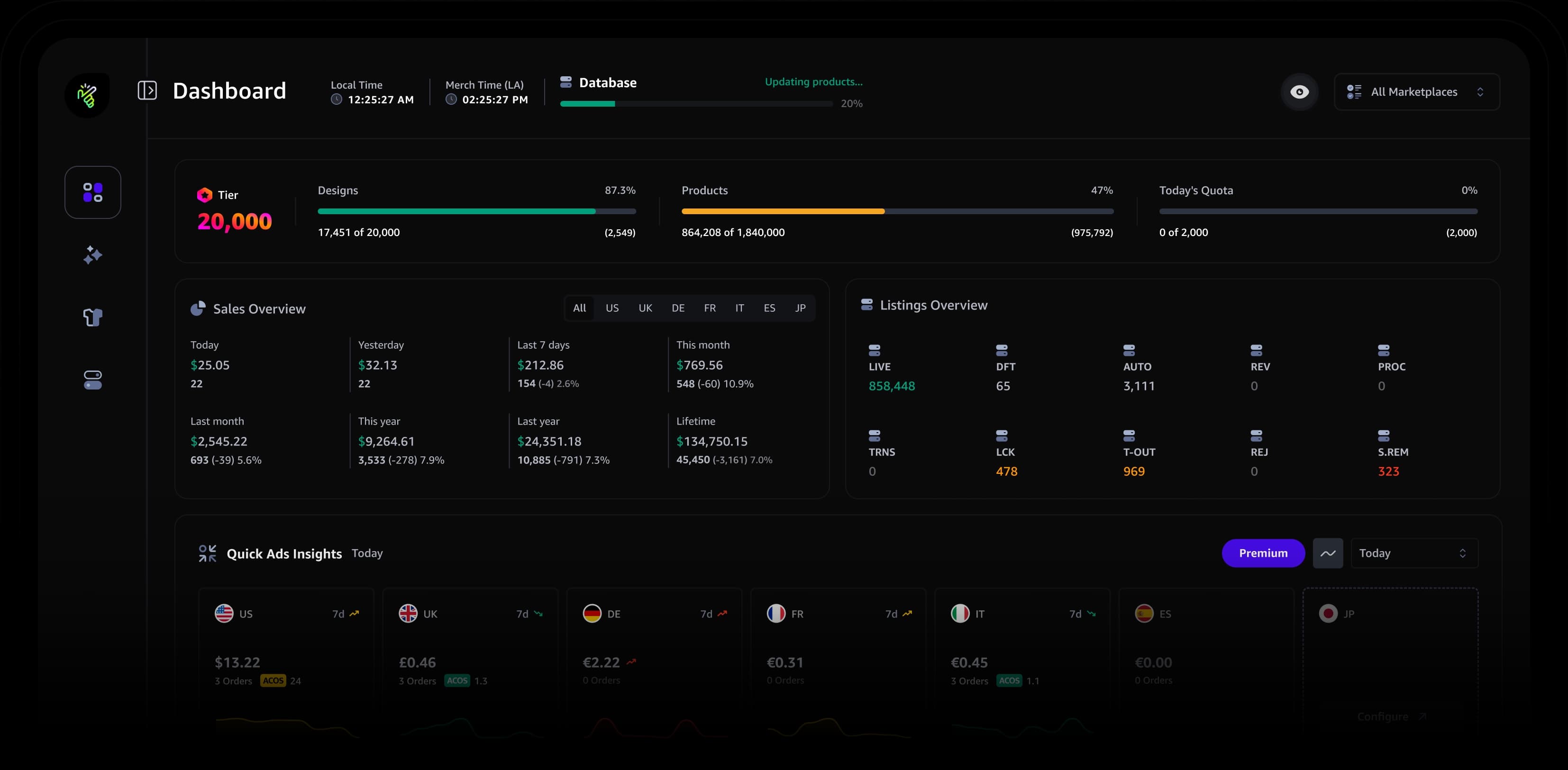
Snap Dashboard: Explore sales, royalties, marketplace performance, listing activity, and advertising insights through one intuitive dashboard.
Products: Explore and manage your product catalog with flexible layouts, smart filters, detailed insights, and powerful listing actions.
Snap Image Studio: Prepare and enhance artwork with Halftone Separation, Image Compression, Background Remover, Image Upscaler, and Image Vectorizer.
New Product Support: Added support for Printed Baseball Hats, Trucker Hats, Sun Visors, Performance T-Shirts, Crop Tops, Comfort Colors Sweatshirts, Comfort Colors Crop Sweatshirts, Performance Hoodies, Backpacks, Hardcover Notebooks, and Value Graphic T-Shirts.
Various Bug Fixes: Resolved issues across Snap to improve reliability and consistency.
General Improvements: Improved performance, usability, and the overall experience throughout Snap.
Added new features including Water Bottle support, Snap Navigator, and Quick Product Enable, along with updates and bug fixes.

Water Bottle Support: Snap now supports the newly added Water Bottle product. It’s fully integrated across Snap Profiles, Bulk Upload, Quick Color & Pricing, Snap Trademark Scan, and Sides Optimization.
Snap Navigator: Easily jump to the top, center, or bottom of the page with a single click for faster navigation.
Quick Product Enable: Enable any disabled product directly from the product mockup with one click.
Quick Product Selection: Quickly select products by category, color compatibility, or marketplace directly from Snap Quick Actions.
Performance Quarter Zip: Fixed an issue where the Performance Quarter Zip product was being skipped during quick product selection based on color filtering.
Trademark Whitelist: Add terms to a whitelist to be skipped during trademark scanning. You can manage your whitelist from the dedicated panel or directly from the Trademark Scan results.
Trademark Scan on Product Pages: Resolved an issue where brand match card was missing during trademark scans on product pages.
Black Brush Performance: Improved performance of the Black Brush option, reducing heavy image processing that could impact performance on average computers.
Clear Merch Session Data: Added an option to clear session storage, cache, and cookies for the Merch portal to help resolve design loading issues.
Introduced new features, performance improvements, and bug fixes.

Snap Trademark Scan: You can now check trademarks directly from product pages within Amazon.com.
Clothing Side Transfer: Bulk side transfer for all clothing products with a single click (Back, Front (Pocket), and Back & Pocket).
Color Conversion: Performance improvements have been applied to the Black Brush option.
Snap Hammer: Fixed a validation bug that caused the Confirm & Report button to stay disabled even after filling all inputs.
Snap Hammer: UI improvements to the Confirm & Report section, plus a new button to generate different issue descriptions on the report page.
Delivered feature updates and resolved a bug.
Color Conversion: Extra Bold option added to Black Outline.
Quick Price Selection: Amazon's latest Tumbler price CAP has been fixed.
Snap Profiles: Resolved a conflict with the Products window that caused dropdowns to become unclickable after interacting with the Products window.
Added a new feature, updated an existing feature, and fixed a bug.

Snap Trademark Scan: Scan your listings for potential trademarked terms before publishing to help reduce takedown risks.
Color Conversion: Black Brush Option added to Color Conversion feature.
Conflicts with other extensions have been fixed.
Introduced multiple new features, feature updates, and general improvements.

Mug Product: (Color Invert): Added black conversion modes (Full, Smart, Outline) with Snap Bulk Upload support.
2 Different Sides (Tumbler/Mugs): View and swap designs on both sides with one click.
Product Price Selection: Adjust prices per marketplace or product using +1 / -1 controls.
Quick Price Selection: Added +1 / -1 price controls to Quick Actions in Snap Profile.
Copy Product Colors: Copy current colors and apply them to all clothing products in one click.
Prices Section Redesign: Cleaner layout with color-coded statuses, marketplace flags, and hover-based quick pricing.
Copy Editor: Clear text fields per or across marketplaces with a 5-second undo option.
CC & Polos Support: Added Comfort Colors Heavyweight T-Shirt and Performance Polo & Quarter Zip with full Snap features support.
Snap Profiles: Profiles now support Colors, Prices, and Fit Types individually or together.
Reset Snap to Default: Reset Snap settings only without affecting other extensions.
Select Products Window: Redesigned UI with selection counter, quick toggles, and new filters by category, color, or marketplace.
Updated several features and fixed a bug.
Mug Product Support: Added Sides & Pattern, Colors & Prices Quick Selection, Color & Prices Profiles, and Snap Bulk Upload.
Scalable Color Swatches: Background color for scalable products can now be picked directly from the uploaded design.
Quick Color Selection: Now supports newly added clothing colors.
Snap Hammer: Resolved popup zoom issue on smaller monitors.
Added a new feature, delivered feature updates, and resolved bugs.

Snap Hammer: Built to make reporting copycats super quick.
Snap Bulk Upload: Introduced Snap Uploader or Native uploader options, fixed automation start issues, and added a toggle to show or hide the Bulk Upload button.
Scalable Color Swatches: You can now apply the selected color to all scalable products with a single click.
Product Color Actions: Dark green now applies correctly to V-Neck and Zip Hoodie products.
Find and Replace: Keywords now apply only after clicking the Replace button, as expected.
Introduced a new feature and updated existing features.

Snap Bulk Upload: Now, you can bulk upload up to 50 designs in one go with full automation.
With a single click, you can add your design to the Frontside (Pocket), Backside, or both at the same time.
Scalable Color Swatches: No more slow color selection for scalable products! Now, you can change colors instantly with a single click.
Snap Uploader with Adaptive Compression.
Quick Price Selection: Amazon's latest price CAP has been fixed.
Added several new features and fixed a reported bug.

Snap Profiles: Generate profiles with custom colors and pricing options, plus export and import profiles.
Quick Color Selection: Apply quick color selection across all products with one click (Dark Colors, Light Colors, and All Colors).
Product Color Selection: Customize specific products by applying Dark, Light, or All Colors individually.
Product Price Selection: Set default, suggested, or market-average pricing with one click.
Some bug fixes to Find & Replace feature.
Introduced multiple new features.

Find and Replace: Enabling you to find and replace up to 4 different keywords in one go.
Copy Editor: Copy, Paste, Paste to All, and Combine feature bullets into description.
Added a new feature.

- Compresses files over 10MB without losing quality.
- Set custom scaling options that work best for your design.
- Download your design instantly after processing.
Introduced a new feature and updated an existing one.

Dynamic Align: Keeps your design centered when adjusting the scale slider under each product.
Upload 2 different designs to Tumbler product
Added new features.
Product Guides off/on toggle for all products.
Combine feature bullets into the description field with a click.
Introduced a new feature along with feature updates and overall improvements.

The Tumbler product now has two tabs: One Side and Two Sides. You can perform scaling actions on either one or both sides. While the One Side option doesn’t have the pattern feature, the Two Sides tab includes it.
The pattern feature is now well-optimized for most designs.
You can now scale and create a pattern for the other scalable products like PopSockets, Phone Cases, Tote Bags, and Throw Pillows.
You can now move your design to the back of the t-shirts and hoodies with a single click.
Your selected scaling options will be saved and remain unchanged until you modify them.
General improvements and minor bug fixes.
There were overlapping issues in the pattern output in some cases, which are now resolved.
Some users experienced an issue where the tool was not visible within the ‘Create New’ page
Initial release with Tumbler feature support only.

Tumbler Support